
Photo extraction
This step pulls still photos out of the videos I shot. I do it in DaVinci Resolve Studio.
White balance
Section titled “White balance”awef
Image overlap
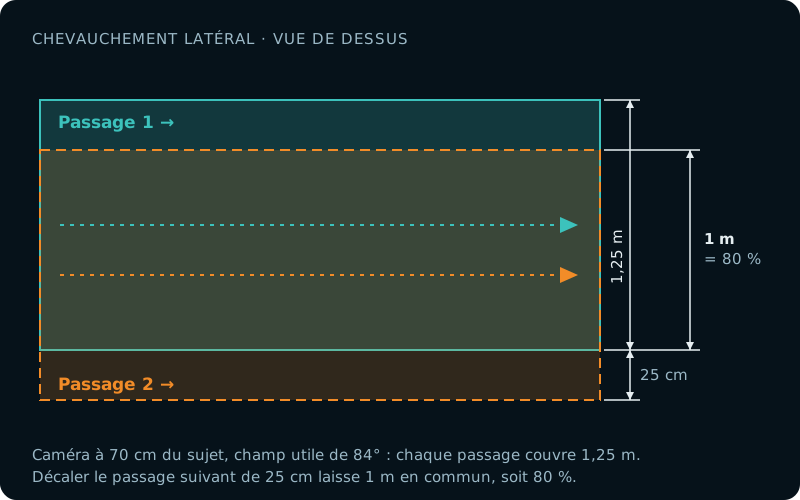
Section titled “Image overlap”The Metashape documentation recommends 80% frontal and 60% side overlap, and 90% frontal and 80% side overlap for a survey over a forest. I chose to aim for 85% overlap, both frontal and side.
Side overlap
Section titled “Side overlap”Side overlap is controlled during data collection. So while filming an object, it’s important to keep in mind the path you’re drawing, so you can plan the next one to get roughly 80% overlap between passes.
Frontal overlap
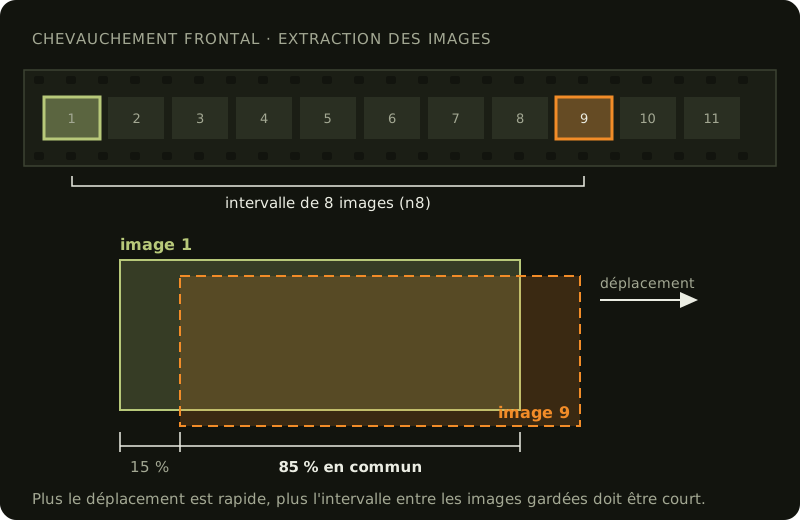
Section titled “Frontal overlap”Frontal overlap, on the other hand, is set when extracting the frames from the videos. While watching the footage, I estimate the interval needed between 2 frames to get roughly 85% overlap.
[Explain how I use effects in DaVinci Resolve to show an 85% frame that helps judge the sampling factor.]
Rule of thumb:
| Conditions | Sampling factor |
|---|---|
| Collected with a scooter, speed 1 | n8 |
| Collected with a scooter, speed 1, camera in portrait mode (turned 90 degrees) | n6 - n8 |
| Finning, no current | n6 - n10 |
| Finning, no current, camera in portrait mode (turned 90 degrees) | n8 |
| Drifting |
File compression
Section titled “File compression”This step shrinks the images considerably without losing any data.